Free credit
Free 1 free credit
Sign in with Google to claim
Best for checking whether one selfie is enough before buying credits.
- ✓No card required
- ✓Visible watermark
- ✓JPG, PNG, WEBP up to 10 MB
- ✓Style presets included
 BEFORE · SELFIE AFTER · LINKEDIN PRESET
 Casual indoor selfie under warm desk lighting, slight phone-camera angle, untucked collared shirt.
Re-lit to neutral studio lighting, head angle corrected, clothing kept business casual, identity and face shape preserved.
An AI headshot generator from one selfie should keep the first screen simple. Upload or try a sample first, then make style decisions after there is a photo to work with.
Use one JPG, PNG, or WEBP selfie up to 10 MB, or pick a sample to see an example result first.
Choose LinkedIn, resume, corporate, medical, legal, realtor, startup, creative, or another preset.
Sign in with Google to generate with 1 free credit. Buy credits only when you want watermark-free sets.
An AI headshot generator from one selfie should show its work before asking for payment. These generated samples show the target direction: professional, realistic, and still recognizably the same person.
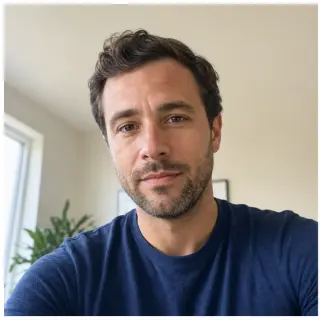

Turns a casual indoor selfie into a cleaner work profile photo while keeping the same person recognizable.


Creates a consistent company-page look for remote teams that do not have the same photographer.


Keeps the result professional without making it feel like a stiff formal portrait.
Replace a casual phone crop with a clean, recruiter-safe professional headshot.
LinkedInTech / StartupCreative / DesignerOutdoor Natural GROUP B — APPLICATIONSCreate a conservative resume or portfolio photo without booking a studio session.
Resume / CV GROUP C — TEAM PAGESGive distributed employees a more consistent company-page look from one selfie each.
Corporate TeamDark Background GROUP D — CLIENT-FACINGMake a polished profile photo for speaking pages, creator bios, sales decks, and author pages.
Speaker / AuthorDoctor / MedicalLawyerRealtorCasual / LifestyleHonest comparisons, common questions, and the tradeoffs behind a one-selfie AI headshot. Skim one of these before spending credits and the result will usually fit better.
The honest tradeoff between speed and identity evidence, and why HeadshotAI starts with one selfie instead of a 20-photo training flow.
Read the comparison →Crop, lighting, clothing, expression, common mistakes, and when an AI LinkedIn headshot is the right call.
Read the checklist →When a studio shoot is still the better choice, when a fast AI workflow is enough, and how to decide between them by stake and timeline.
Read the comparison →What changes between watermarked previews and clean exports, and how to evaluate the free path before paying anywhere.
Read the guide →When a heavier multi-photo workflow is worth the friction, and when a one-selfie tool fits the moment better.
Read the alternative →Start with 1 free credit after Google sign-in. Add credits only when you want watermark-free headshots for profiles, resumes, or team pages.
Sign in with Google to claim
Best for checking whether one selfie is enough before buying credits.
≈ — per headshot set of up to 4 results
Best for one person who wants several usable headshot options.
≈ — per headshot set of up to 4 results
Best for trying several styles and keeping multiple profile photos.
≈ — per headshot set of up to 4 results
Best for teams, agencies, and repeated profile updates.
One credit starts a set of up to four results. If the service does not deliver the full set because a provider task fails, the credit is returned automatically — no support ticket needed. Completed results remain available. For billing issues or other refund questions, email [email protected].
Start with one selfie per person and create a consistent baseline for company pages, sales profiles, internal directories, and founder bios.
One-selfie generation is fast, but large team projects still need human expectations: photo guidance, style approval, and a fallback path for weak selfies.
A headshot is personal. Use your free credit to judge whether the output is honest enough for a real work profile.
Check eyes, hairline, jaw, age, glasses, and overall face shape before spending credits.
If it does not feel like you on a video call, use a better selfie first.
Judge the result against the platform: LinkedIn, resume, company page, speaker bio, or team directory.
A polished image is not useful if the style does not match the audience.
One-selfie generation depends on the source photo. Even light, direct eye contact, and no heavy filter matter.
A weak input is faster to retake than to repair after generation.
The free credit is for judging quality. Paid credits are for public, watermark-free profile use.
Do not use a watermarked result as a final professional image.
The important details are simple: upload first, sign in with Google to generate (1 free credit for new accounts), and use paid credits for watermark-free exports.
Yes. Sign in with Google and your new account gets 1 free credit for a watermarked headshot set. Sets generated after you buy credits are watermark-free, with cleaner exports.
You can upload a selfie or choose a sample first. Generating requires a Google sign-in, and your selfie stays selected while you sign in. Your account holds results, credits, refunds, and support.
The first release is built around one clear selfie. Multi-photo tools can be better for identity consistency, but they also add friction. Our goal is a fast professional option when you do not want a long training flow.
JPG, PNG, and WEBP are supported up to 10 MB. HEIC is not promised in the first release because phone and browser conversion is not consistent enough for a launch promise.
The prompt is designed to preserve identity, age, face shape, hair, and expression. A weak selfie can still produce a poor match, so use clear front-facing photos and treat the first result as a quality check.
From October 10, 2026 (UTC), free image results are kept for 30 days; earlier free results will not be removed before November 9, 2026 (UTC). Download a copy before expiry. Paid results keep their existing account-history policy. Source uploads are retained as needed for the related result and support. Separately, deletion requests are processed within 30 days. See the privacy policy for details.
One-selfie generation is fast, but it is not a magic identity model. A weak input still produces a weak result. Use a current, front-facing selfie with even light, no sunglasses, no heavy filter, and enough resolution around the face. If a generated headshot no longer feels like you, switch the source photo before spending more credits. We do not recommend using AI headshots for identity verification, legal documents, or any context where the photo is treated as an official record of appearance.
Generation requires a Google sign-in. Your account is used to generate, download, use credits, request refunds, or get support. From October 10, 2026 (UTC), free results are kept for 30 days, with earlier free results protected until at least November 9, 2026 (UTC). Download your free images before expiry. Paid generation sets are kept only as long as needed for account history, repeat downloads, support, and abuse prevention. You can request deletion through the support channel, and we process deletion requests within 30 days. We do not sell uploaded photos, and we do not use them for unrelated training.
Explore related pages
Start from the main generator, then choose LinkedIn, professional, corporate, resume, or example-led pages.