Upload first
Check your selfie in the browser before creating an account.
Use this guide to judge whether a LinkedIn photo will feel current, direct, and credible in a small profile circle. When you are ready to test a selfie, open the dedicated generator.
A guide cannot fix a blurry or heavily filtered source photo. Use a current, front-facing image with even light, then review the generated result against how you look in a video call.
Check your selfie in the browser before creating an account.
Use the free watermarked preview to judge identity match, crop, and style fit.
Sign in to download previews or keep generating. Use paid credits for watermark-free headshots.
LinkedIn renders profile pictures as small circles in feed, search, comments, and recruiter views. A photo that looks fine on a phone screen can lose almost all detail at 48 pixels. The faces that work best are face-forward, well lit, and cropped tightly enough that the eyes still register at small size. Casual selfies often fail at this size because the camera was too far, the lighting was uneven, or the background carried unrelated detail. A LinkedIn-targeted AI headshot fixes those constraints in one pass: cleaner light direction, tighter crop, neutral background, and clothing that reads as work-appropriate without overcommitting to a suit.
Recruiters trust photos that look current, calm, and credible. They distrust beauty filters, exaggerated glamour lighting, or aggressive retouching that smooths skin into plastic. A recruiter-safe headshot keeps natural skin texture, preserves your hairline and face shape, and uses an outfit that matches the role you are applying for. The HeadshotAI LinkedIn preset is tuned for this conservative direction. If a generated result changes your face too much, the right move is not to keep regenerating with the same input but to upload a sharper, more neutral selfie.
A founder updating a launch page, a senior engineer changing jobs, and a sales lead at a financial services firm should not look the same on LinkedIn. The HeadshotAI generator includes presets for LinkedIn, corporate, startup, lawyer, doctor, realtor, speaker, and creative directions. Pick the style that matches the audience that will see the photo most often. If you are unsure, create a LinkedIn preview first, judge whether it feels honest in a video call screenshot, and add credits only when it passes that test.
Most LinkedIn photos are not bad on purpose. They are byproducts of small choices that quietly add up. A photo cropped from a wedding has someone else's shoulder still visible. A photo from a vacation has a sunset that pulls attention from the face. A photo from an old badge has hair and glasses that no longer match the person. A photo with a heavy beauty filter looks polished but feels off in a video call. The fix is not always a new shoot. Often it is a sharper crop, a quieter background, and a more recent source. The dedicated LinkedIn generator handles the crop, lighting direction, and background after you have chosen a suitable source selfie. The source photo is the part you control.
Use these generated samples to judge the direction before uploading your own selfie.
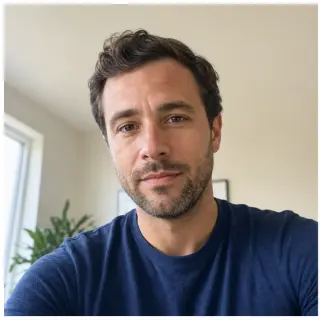
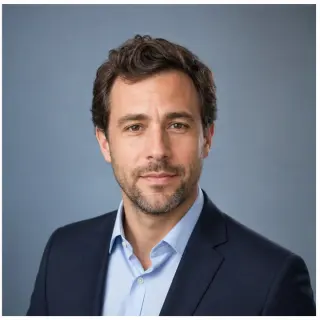
Turns a casual indoor selfie into a cleaner work profile photo while keeping the same person recognizable.
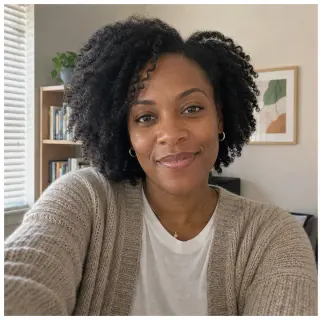
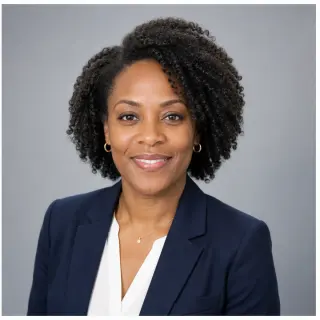
Creates a consistent company-page look for remote teams that do not have the same photographer.


Keeps the result professional without making it feel like a stiff formal portrait.
Scenario-specific questions first, followed by the general HeadshotAI FAQ. If your question is not covered, write to [email protected].
Use a current, front-facing photo with even light, a calm expression, and visible hairline. Avoid sunglasses, heavy filters, side angles, harsh overhead light, group crops, and gym mirrors. The clearer the input, the less the model has to guess.
A small natural smile usually works best for sales, recruiting, customer-facing, and consulting roles. A calm closed-mouth expression can fit law, finance, and senior technical roles. Either should look approachable, not tense.
It is safe when the result still looks like you and matches your real role. It is not safe to misrepresent appearance, age, or identity. If a recruiter would not recognize you in a video call, the photo is too edited.
Update when your hair, glasses, weight, or facial features change enough that the current photo no longer matches you, or when you change roles and the previous style no longer fits the audience.
Yes. You can view one free watermarked preview in the browser before sign-in. Sign in to download previews or keep generating. Paid credits remove the watermark and unlock cleaner exports.
No. You can upload a selfie or choose a sample first. The first watermarked preview can run before sign-in on this device. Sign-in is used for downloading previews, paid result history, credits, refunds, and support.
The first release is built around one clear selfie. Multi-photo tools can be better for identity consistency, but they also add friction. Our goal is a fast professional option when you do not want a long training flow.
JPG, PNG, and WEBP are supported up to 10 MB. HEIC is not promised in the first release because phone and browser conversion is not consistent enough for a launch promise.
Use these links to compare presets, read the supporting articles, or jump to a different audience.
Skip the reading and generate a LinkedIn-style preview from one selfie.
Crop, lighting, clothing, expression, and AI usage rules in one checklist.
When a studio shoot still wins, and when an AI workflow is enough.
Distributed-team workflow if you need to update more than one profile.
A quieter neutral preset for application materials.