Clean, approachable, recruiter-safe profile photo.
AI headshot examples
Selfie to professional headshot examples
These generated samples show the intended quality bar: cleaner lighting, stronger crop, professional clothing, and a result that still looks like the same person.
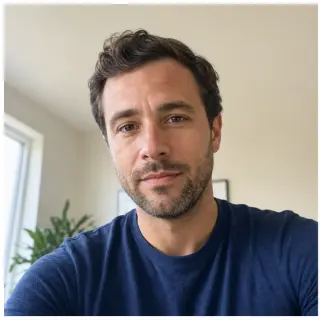
Before
After
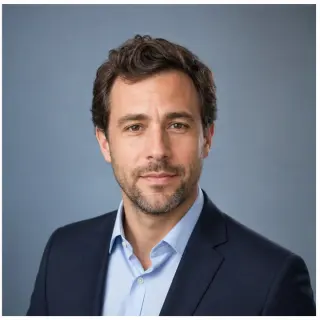
LinkedIn-ready profile
Turns a casual indoor selfie into a cleaner work profile photo while keeping the same person recognizable.
- Input
- Casual indoor selfie under warm desk lighting, slight phone-camera angle, untucked collared shirt.
- AI did
- Re-lit to neutral studio lighting, head angle corrected, clothing kept business casual, identity and face shape preserved.
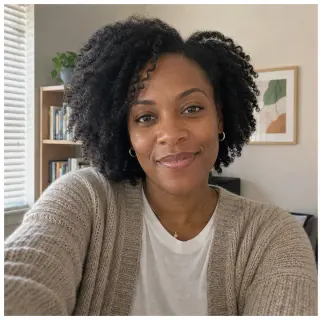
Before
After
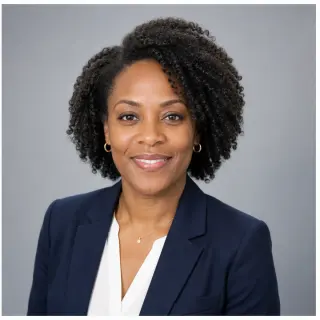
Corporate team style
Creates a consistent company-page look for remote teams that do not have the same photographer.
- Input
- Mixed natural and overhead office light, friendly but unposed expression, plain t-shirt against a busy background.
- AI did
- Replaced background with a clean gray studio backdrop, normalized lighting, swapped to a tidy company-page outfit, kept the same expression.
Before
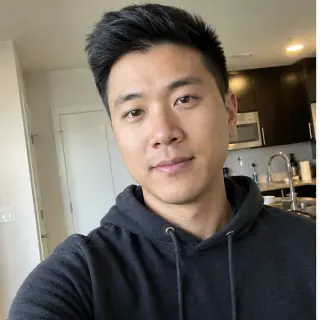
After
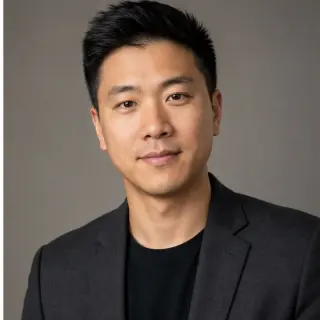
Modern startup headshot
Keeps the result professional without making it feel like a stiff formal portrait.
- Input
- Outdoor smartphone photo with sharp afternoon shadows and a casual hoodie.
- AI did
- Softened shadows, brightened skin tones, swapped to a smart casual jacket, preserved the relaxed natural expression.
Style presets
Resume / CV
Neutral, polished, and conservative for applications.
Corporate Team
Consistent team-page style for company profiles.
Doctor / Medical
Calm, credible, and patient-facing.
Lawyer
Formal, confident, and client-ready.
Realtor
Warm, local, and sales-friendly.
Speaker / Author
Editorial headshot for bios and events.
Tech / Startup
Modern, sharp, and less formal.
Creative / Designer
Professional without feeling corporate.
Casual / Lifestyle
Relaxed profile photo for broader social use.
Dark Background
Premium dark studio look.
Outdoor Natural
Bright natural-light profile photo.
How to read each before and after pair
Each pair on this page is a real input and a real generated output. The left image shows what the user uploaded: a casual selfie with everyday lighting, framing, and clothing. The right image shows what the AI returned for the same person at the chosen style preset. The pair is not meant to make the input look bad. It is meant to show what the AI changes and what it leaves alone. Identity, face shape, eye spacing, hair direction, age, and overall expression are preserved. Lighting, background, framing, and clothing direction are adjusted to fit the work-profile context.
What this page is not trying to prove
Examples on AI headshot landing pages are often cherry-picked from a much larger pool. The samples here are intentionally average inputs, not flattering portraits. A friendly truth is that one-selfie generation works best when the source photo is sharp, evenly lit, and front-facing. If a sample on this page looks weak to you, that is useful feedback. Use a sharper selfie than the sample and the generated output will usually improve. The point of the gallery is direction, not maximum polish.
How to pick a style preset before uploading
The fastest way to choose a style is to think about where the photo will appear. LinkedIn and consulting profiles tend to fit the LinkedIn or corporate preset. Resumes and applications fit the resume preset. Conference bios, podcast pages, and author bios fit the speaker preset. Realtor and sales pages fit warmer presets. Doctor, lawyer, and clinical roles fit the matching preset. If you are unsure, start with LinkedIn, judge the watermarked preview, and add credits only when the result fits the platform you intend to use.
What changes between the input and the output, area by area
Reading the gallery in detail is a faster way to understand the model than any description. Look at the background: the input often has a real room, the output has a clean studio gradient. Look at the light direction: the input may be lit from above or from one side, the output is corrected toward a softer front light. Look at the crop: the input is sometimes too wide or has tilted shoulders, the output frames upper chest to the top of the head. Look at clothing: the input may show a hoodie or a t-shirt, the output presents tidy professional layers that match the chosen preset. Look at the face: face shape, eyes, hairline, and skin texture stay close to the input, with smoothing kept restrained.
Reading the samples for your specific need
Pick the sample that is closest to the situation you are trying to solve. If you have a casual indoor selfie and need a LinkedIn profile, the LinkedIn sample is the most relevant baseline. If you need a coordinated company page with photos taken in different rooms, the corporate sample shows what that normalization looks like. If your photo is from outdoors, the startup sample is closer in lighting to your starting point. The samples are not promises about your specific result, but they are the closest read on the model's direction at each preset.
Reading the gallery
Quick answers to the questions people ask after browsing the before and after pairs above.
Are these examples generated from real selfies? +
Yes. Each pair shows the actual upload on the left and the actual generated result on the right at the chosen preset.
Will my result look exactly like one of these examples? +
No. The style direction transfers, but the result is anchored to your face, hair, age, and expression. Examples show the target direction, not a guaranteed outcome.
Why do some after photos still look like a real photo and not a 3D render? +
The model is tuned for restrained edits: lighting, background, framing, and clothing direction. It tries to preserve skin texture and natural identity rather than impose a glossy studio render.
Which preset is the best starting point if I cannot decide? +
Start with LinkedIn. It produces the most generally useful result for work-facing platforms and helps you judge whether your selfie is strong enough before trying more specific presets.
What if my selfie is much weaker than the inputs in the gallery? +
Take a new one before generating. Stand near a window, face the camera directly, remove sunglasses, avoid filters, and keep enough resolution around the face. The generated headshot can only inherit identity that the source photo actually shows. A sharper input usually improves the result more than buying additional credits would.
Do all the presets work equally well from the same input selfie? +
Most presets work from the same input, but some are more sensitive than others. The doctor and lawyer presets expect a calmer expression than the speaker or realtor presets, so a smiling selfie may translate better to the warmer styles. If a result feels off, try a different preset before changing the source photo.
Related pages and reading
Pick the right preset for your use case or read the supporting articles before generating.
1 selfie vs multi-photo training
Why these results come from a single source photo.
Professional headshot vs AI headshot
Where these samples sit relative to a studio session.
LinkedIn profile photo guide
Learn the platform fit before you choose a preset.
LinkedIn headshot generator
Apply the LinkedIn preset to your own selfie.
Corporate headshots
Use the corporate preset for company pages and team profiles.
Resume headshot generator
Quieter preset built for application materials.