Upload first
Check your selfie in the browser before creating an account.
Resume photos need to be simple. The safest result is neutral lighting, a calm expression, and no stylized background that distracts from your experience.
Some industries and countries do not expect resume photos. Use the result where a profile photo is normal, and avoid adding one when it could work against local hiring norms.
Check your selfie in the browser before creating an account.
Use the free watermarked preview to judge identity match, crop, and style fit.
Sign in to download previews or keep generating. Use paid credits for watermark-free headshots.
A resume headshot is not a portrait. It is a small reassurance. A reviewer scanning a stack of applications uses the photo to confirm that the person looks present, current, and professional enough to interview. Anything beyond that, including dramatic lighting, stylized backgrounds, or fashion-leaning poses, can pull attention away from the rest of the resume. The HeadshotAI resume preset is intentionally restrained: neutral background, even light, simple clothing, and a calm direct expression. The result should look like a quiet professional photo rather than an editorial one.
Resume photo norms vary by country and industry. In the United States and the United Kingdom, photos are not standard on most resumes and may be screened out by some employers to reduce bias risk. In much of Europe, Latin America, the Middle East, and parts of Asia, photos are common or expected. For LinkedIn, portfolio sites, About pages, and bio sections, a photo is almost always useful. The safest rule is to ask three questions before adding a photo: is it expected in your industry, does it match local hiring norms, and does it represent you accurately at a small size.
Conservative does not mean lifeless. A good resume headshot has a clear face, healthy color, a quiet background, and clothing that fits the field. The difference between dull and conservative is usually expression and crop. A photo where the eyes engage the camera and the smile is small and natural reads as confident even with neutral styling. The HeadshotAI resume preset preserves your real expression rather than imposing a fake one. If the input selfie has a tense or unnatural expression, the output will inherit it. Take a moment to relax your face before the source photo.
If you are applying in the United States, Canada, the United Kingdom, Ireland, or Australia, most general resumes do not include a photo, and some applicant tracking systems specifically discourage them. If you are applying in Germany, France, Spain, Italy, much of Latin America, the Middle East, or many parts of Asia, a photo is common or expected on the standard CV. Industry also matters: hospitality, real estate, on-screen acting, modeling, and customer-facing roles often expect a photo even in regions that otherwise discourage it. When in doubt, leave the photo off the resume itself and use it on the LinkedIn profile, portfolio site, or About page that the resume links to.
Use these generated samples to judge the direction before uploading your own selfie.


Turns a casual indoor selfie into a cleaner work profile photo while keeping the same person recognizable.
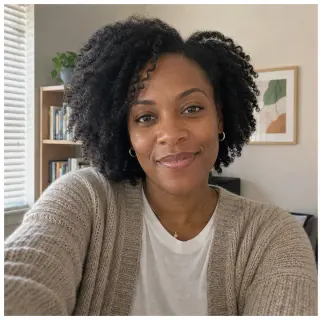
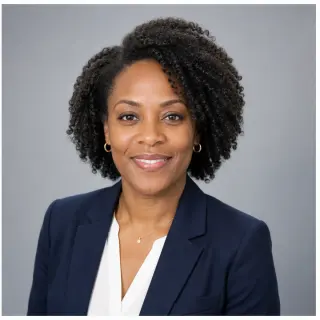
Creates a consistent company-page look for remote teams that do not have the same photographer.


Keeps the result professional without making it feel like a stiff formal portrait.
Scenario-specific questions first, followed by the general HeadshotAI FAQ. If your question is not covered, write to [email protected].
A plain gray, off-white, or soft blue-gray background is usually safest. Avoid cluttered rooms, decorated offices, vehicles, or anything that adds personality the resume does not need.
Match the role. A blazer or button-down works for most office roles, a tidy sweater works for tech and creative roles, and a clean clinical look fits healthcare. Avoid bold patterns, novelty graphics, and clothing that distracts from the face.
Yes if the style fits both. A LinkedIn-targeted result is sometimes slightly warmer. A resume-targeted result is usually quieter. If you want both, generate one of each preset rather than reusing the same image in two contexts that read differently.
It should match how you look right now. If you have changed hair, glasses, or facial hair noticeably since the source photo, take a new selfie before generating.
Yes. You can view one free watermarked preview in the browser before sign-in. Sign in to download previews or keep generating. Paid credits remove the watermark and unlock cleaner exports.
No. You can upload a selfie or choose a sample first. The first watermarked preview can run before sign-in on this device. Sign-in is used for downloading previews, paid result history, credits, refunds, and support.
The first release is built around one clear selfie. Multi-photo tools can be better for identity consistency, but they also add friction. Our goal is a fast professional option when you do not want a long training flow.
JPG, PNG, and WEBP are supported up to 10 MB. HEIC is not promised in the first release because phone and browser conversion is not consistent enough for a launch promise.
Use these links to compare presets, read the supporting articles, or jump to a different audience.
When booking a photographer is worth it and when a fast workflow is enough.
What changes between watermarked previews and clean exports.
Crop, lighting, expression, and recruiter-safe platform guidance.
Run the LinkedIn preset on one selfie when you are ready to preview.
Test the quality on a watermarked preview before buying credits.